The short version: this portfolio doubles as an in-browser analytical sandbox. The tennis analytics do not go through a traditional server backend or a dedicated database API. The visitor's browser starts a WebAssembly-based DuckDB worker, reads remote Parquet files through CloudFront and renders the results in the page.
That split keeps the personal site light while still showing a real client-side OLAP workflow.
Architecture at a glance
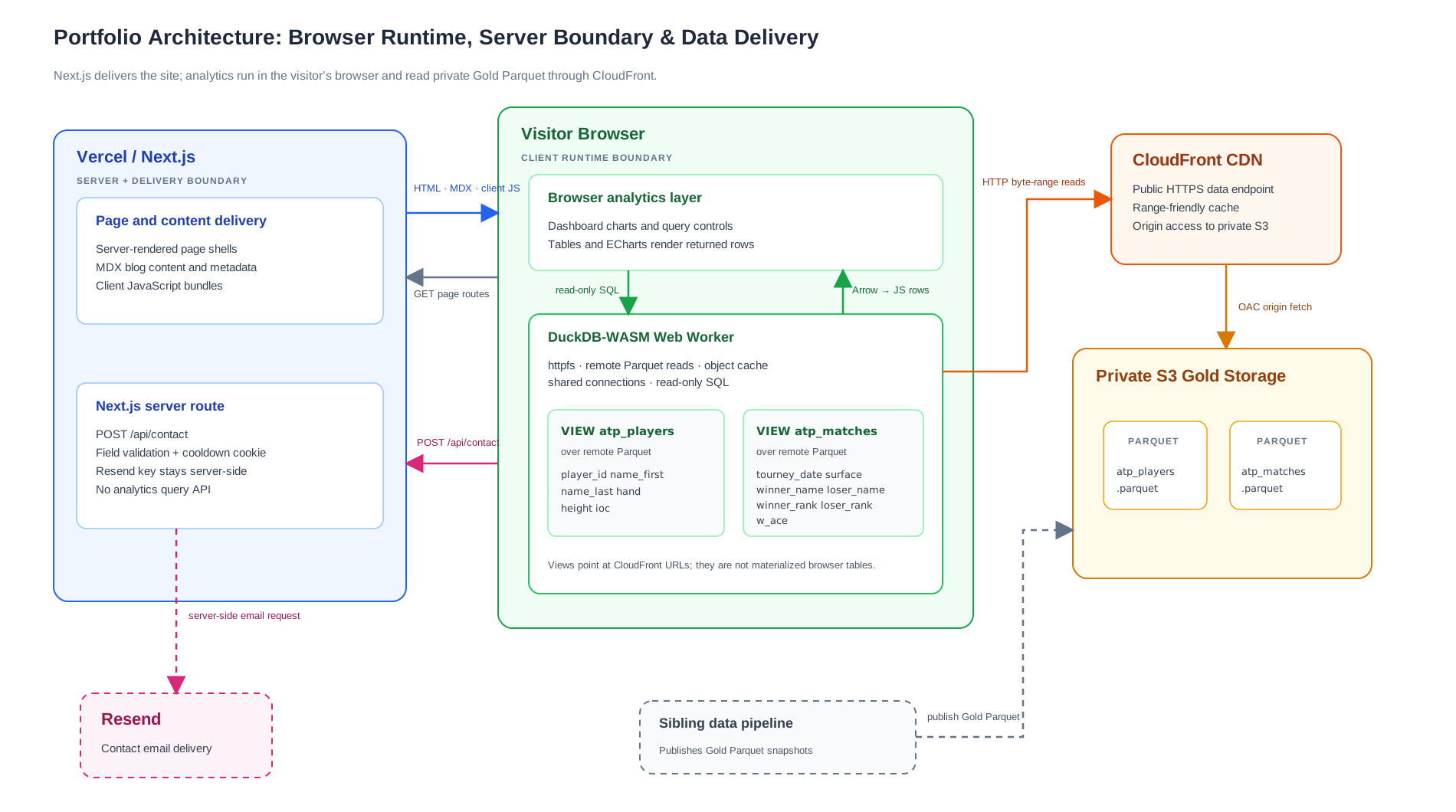
The portfolio separates the browser analytics engine, remote data delivery and private contact workflow.
View the diagram as an SVG.
What runs where: the four core layers
1. In-browser analytics engine
DuckDB-WASM runs inside a Web Worker, so database setup and heavy query work are kept away from the main UI thread. The app creates a shared DuckDB instance with a small connection pool, loads the httpfs extension and enables an object cache.
When a query reads a remote Parquet file, DuckDB can inspect the file metadata first and request the relevant HTTP byte ranges for selected columns and filtered row groups. This is why the browser does not need to download the whole dataset for every chart.
The runtime selects a compatible DuckDB-WASM browser bundle, starts the worker, opens a connection, loads httpfs and creates the stable atp_players and atp_matches relations as views over the configured CloudFront Parquet URLs. Query results come back as Apache Arrow data, then the current client code maps the rows to JavaScript objects for tables and ECharts.
One worker is shared by the dashboard, the SQL console and embedded live query blocks. That avoids starting a separate database runtime for each interactive surface.
2. Remote storage and CDN boundary
The dataset lifecycle is separate from the web application. A sibling batch pipeline cleans the tennis source data and publishes the browser-facing Gold Parquet objects to private S3 storage.
CloudFront is the public delivery boundary. Origin Access Control lets the distribution read the private S3 origin while the bucket stays closed to public access. The CDN can cache range requests at the edge, which helps repeated reads without putting AWS credentials in the browser.
The browser only knows an HTTPS data URL. It does not receive an IAM key, an STS token or a server route that proxies every Parquet byte.
3. Page shell and MDX content layer
Next.js App Router manages page rendering, metadata and the blog. MDX posts are compiled with the app, and the blog derives reading time, heading links and related-post data from each post's metadata and content.
The interactive boundary is opt-in. A normal article can render as content, while an article with a live query block can wait for the shared DuckDB runtime and run a scoped read-only query when the widget is rendered.
The app also sends Cross-Origin-Opener-Policy with the value same-origin and Cross-Origin-Embedder-Policy with the value require-corp. Those headers are needed for the shared-memory browser setup used by the DuckDB-WASM worker.
4. Private contact route
Work that needs a secret stays on the server. The /api/contact route validates the name, email and message, applies a two-minute cookie cooldown and sends the email through Resend using server-side environment variables.
The route uses direct field checks rather than a schema library. The important boundary is that the Resend key never ships in a client bundle.
Lazy loading between DuckDB-WASM and the client console
The analytics runtime is lazy on purpose. The home page starts a background prefetch shortly after the first render, but the worker, httpfs, object cache, connection pool and remote views are still created in the browser. If the SQL console is opened before that setup finishes, its Run Query button stays disabled until the shared DuckDB state reports that it is ready.
The console itself is mounted when the visitor opens the data-loading section. It shares the existing DuckDB singleton instead of creating a second database. The default SQL appears in the editor, but no query runs just because the console mounted. The output table is created only after the visitor clicks Run Query.
That gives the UI two useful lazy boundaries:
- The database runtime and remote relations are prepared on demand.
- Query results are prepared only after a user action.
The dashboard charts use the same runtime. MDX live query blocks follow the same ready state, show a loading state while the query is running and then render the returned rows.
Analytics lifecycle: from click to chart
- The page renders its normal UI while background setup begins.
- DuckDB-WASM boots inside a Web Worker and loads its HTTP filesystem support.
- The browser checks that the two Parquet objects are reachable and registers the atp_players and atp_matches views.
- A chart, console action or live query block submits read-only SQL to the worker.
- DuckDB evaluates the plan and requests the relevant remote Parquet ranges.
- The result arrives as Apache Arrow data and is mapped to JavaScript rows.
- The table or ECharts component renders those rows in the browser.
The SQL path rejects common write-operation keywords. That is a useful guard for a public demo, but it is not meant to be a complete SQL security system.
Trade-offs and engineering choices
| Dimension | In-browser DuckDB + Parquet | Traditional backend API |
|---|---|---|
| Idle work | Storage and CDN delivery only | A running database or compute service |
| First visit | WASM startup plus remote metadata reads | API connection and server query |
| Query work | The visitor's browser does the aggregation | The backend does the aggregation |
| Data shape | A good fit for this read-heavy snapshot | Better for very large or frequently changing datasets |
| Operations | Publish Parquet and deploy the site | Operate API capacity, indexes, backups and patches |
For a portfolio, this is a useful balance. The infrastructure is visible, the SQL is interactive and there is no extra query service to keep alive just to power a demo dashboard. The trade-off is just as clear: the browser does more work, and the analytics depend on the remote Parquet endpoint being available.